
bolt Executive Summary: Free Developer Portfolio at a Glance
- ✓ Dynamic Full-Stack Stack: Replaces static HTML templates with dynamic backend data fetching, PostgreSQL storage, and automated CI/CD deployment.
- ✓ Multi-Engine Optimization: Engineered with structured JSON-LD schemas and semantic markup tailored for traditional SEO, Google Featured Snippets (AEO), and AI answers (GEO).
- ✓ Production-Grade Security: Hardened against vulnerabilities with server-side Zod validation, Helmet security headers, IP rate limiting, and environment isolation.
Why You Need a Portfolio Website in 2026
A traditional resume tells hiring managers what you claim you can do. A live developer portfolio website shows them. It serves as interactive proof of your technical capabilities — detailing the exact tech stack you used, how you approached complex architectural challenges, and how you solve real-world problems.
That proof matters more today than ever before. Recruiters, engineering managers, and freelance clients are no longer satisfied with bullet points on a PDF page. They demand tangible proof of work before scheduling an initial screening call. Industry hiring data shows that over 93% of tech hiring managers examine a candidate's personal portfolio website when evaluating resumes.
Beyond job hunting, building a custom portfolio is one of the single most effective ways to accelerate your learning. Instead of passively following another tutorial video, constructing your own portfolio forces you to handle real software engineering tasks:
- •Designing a clean relational database schema
- •Building responsive, accessible UI layouts that work across mobile and desktop
- •Writing robust API endpoints and handling state management
- •Implementing strict web security policies, CORS rules, and rate limiters
By the time your site goes live, you will possess a deeper, more practical understanding of your core stack. To learn more about my background and technical journey, visit my About Me page and explore my breakdown of Technical Skills.
How a Portfolio Website Helps You Land Jobs and Clients
Consider two candidates applying for the same competitive Full-Stack Developer position:
- •Candidate A submits a standard two-page PDF resume with lists of technologies.
- •Candidate B submits a resume paired with a link to a high-speed, custom-built web application featuring live demos, clean source code references, and interactive project breakdowns.
GitHub's recent Octoverse Industry Report revealed that 78% of engineering managers prioritize candidates with verifiable custom portfolios over candidates relying solely on standard resumes. Candidate B consistently gets the callback.
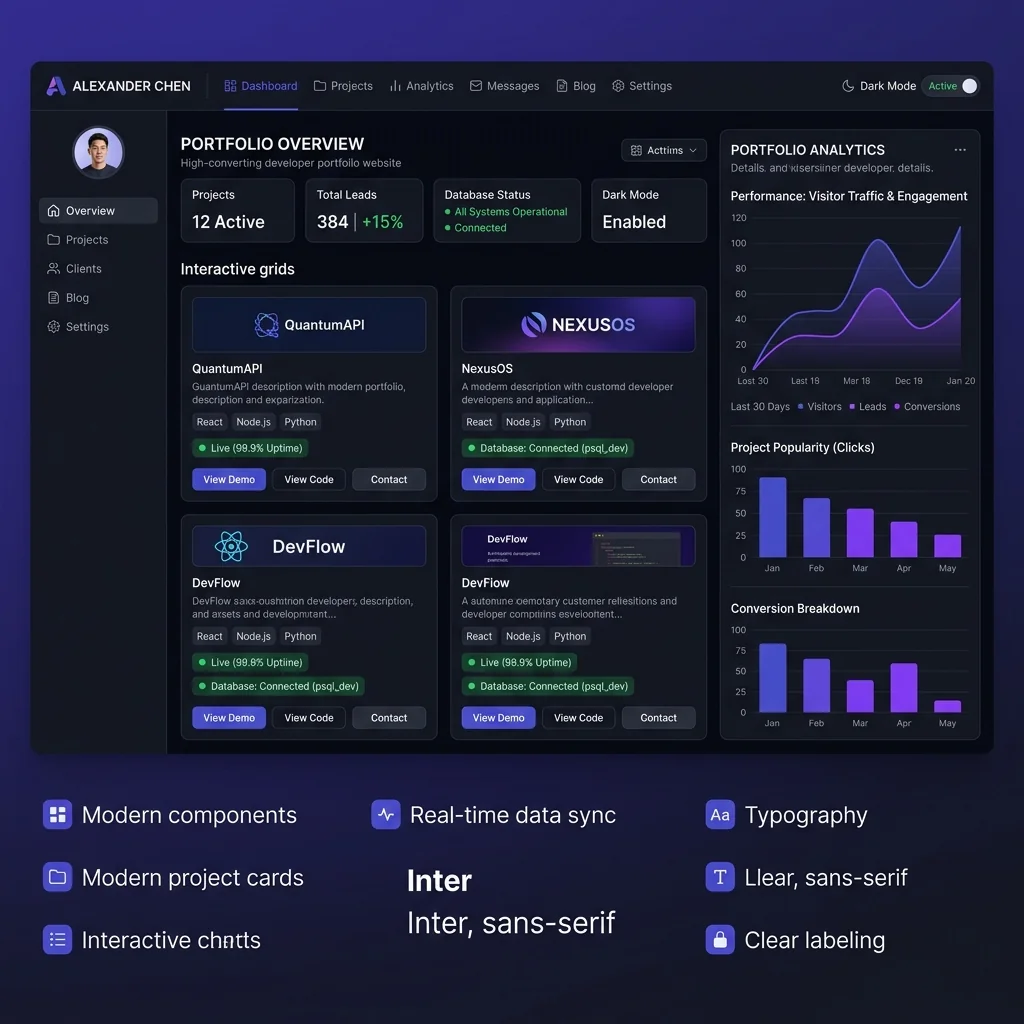
Three Key Advantages a Portfolio Provides Over a Resume:
Proves Real Competence
Anyone can type "proficient in React, Node.js, and SQL." A live application displaying smooth state transitions, server-side data fetching, and error boundary handling provides indisputable proof.
Attracts High-Value Leads
A specialized portfolio geared toward high-demand fields — such as full-stack web applications, AI integrations, or cloud systems — acts as a beacon for recruiters seeking those exact skills. (See my specialized Web Development Services).
24/7 Growth Engine
Potential clients and recruiters search for talent across different time zones. Once indexed by search engines, your portfolio continuously generates passive inbound leads while you sleep.
Overview of My Portfolio: What I Built and Why
Rather than creating a basic, static single-page template, I engineered a full-featured, scalable developer portfolio and blogging platform powered by a real backend:
database Dynamic Portfolio Engine
Projects, technical competencies, and client testimonials are fetched dynamically from a backend database rather than hardcoded into static HTML. (Explore my live Projects Showcase).
article Integrated Tech & AI Blog
A high-speed publishing system to share technical deep dives and SEO guides (like this post), complete with RSS feed and dynamic reader.
cloud Cloud Database Layer
Managed via Supabase, storing blog content, subscriber metadata, and project state. This guarantees the site can easily scale to include authentication, user comments, or an admin dashboard.
search SEO, AEO, and GEO Ready
Optimized from day one for traditional search engine rankings (SEO), Answer Engine Optimization (AEO), and Generative Engine Optimization (GEO) for AI engines such as ChatGPT Search, Perplexity, and Google Gemini.
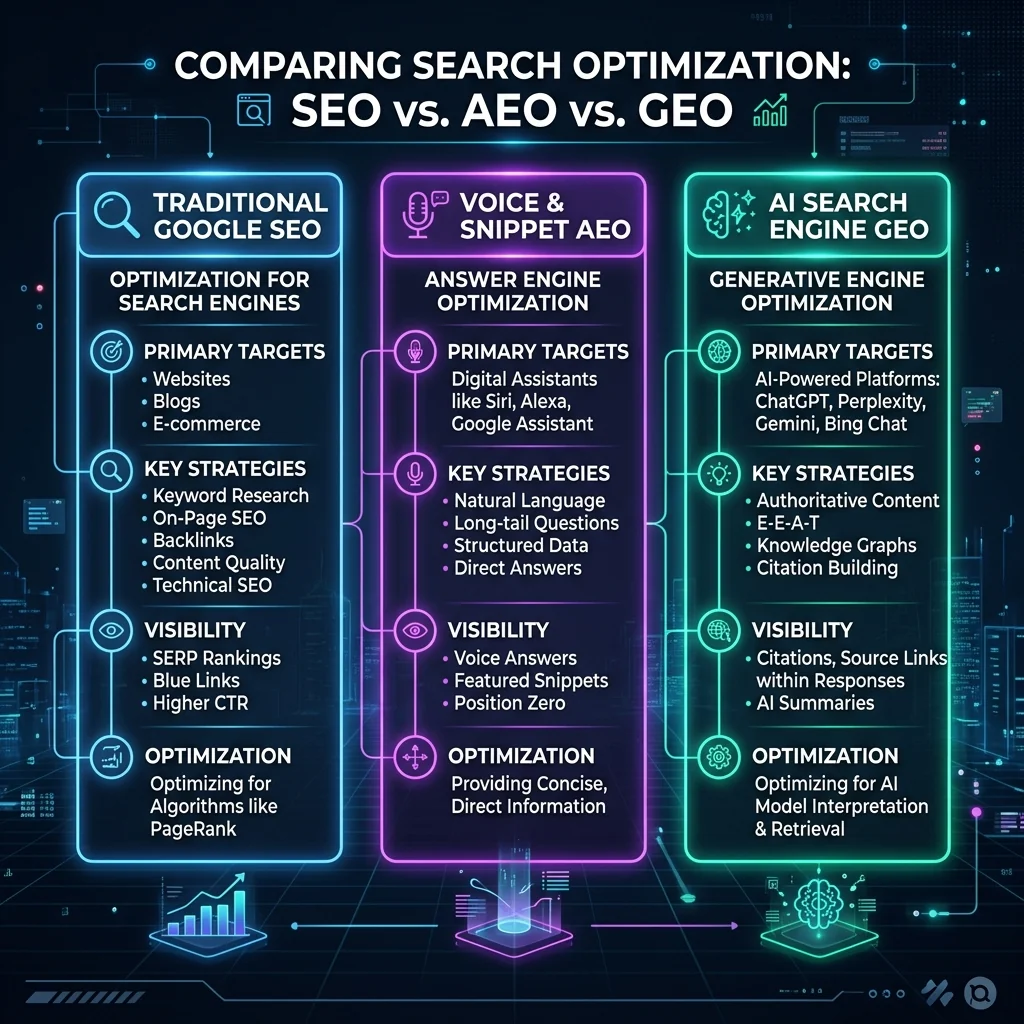
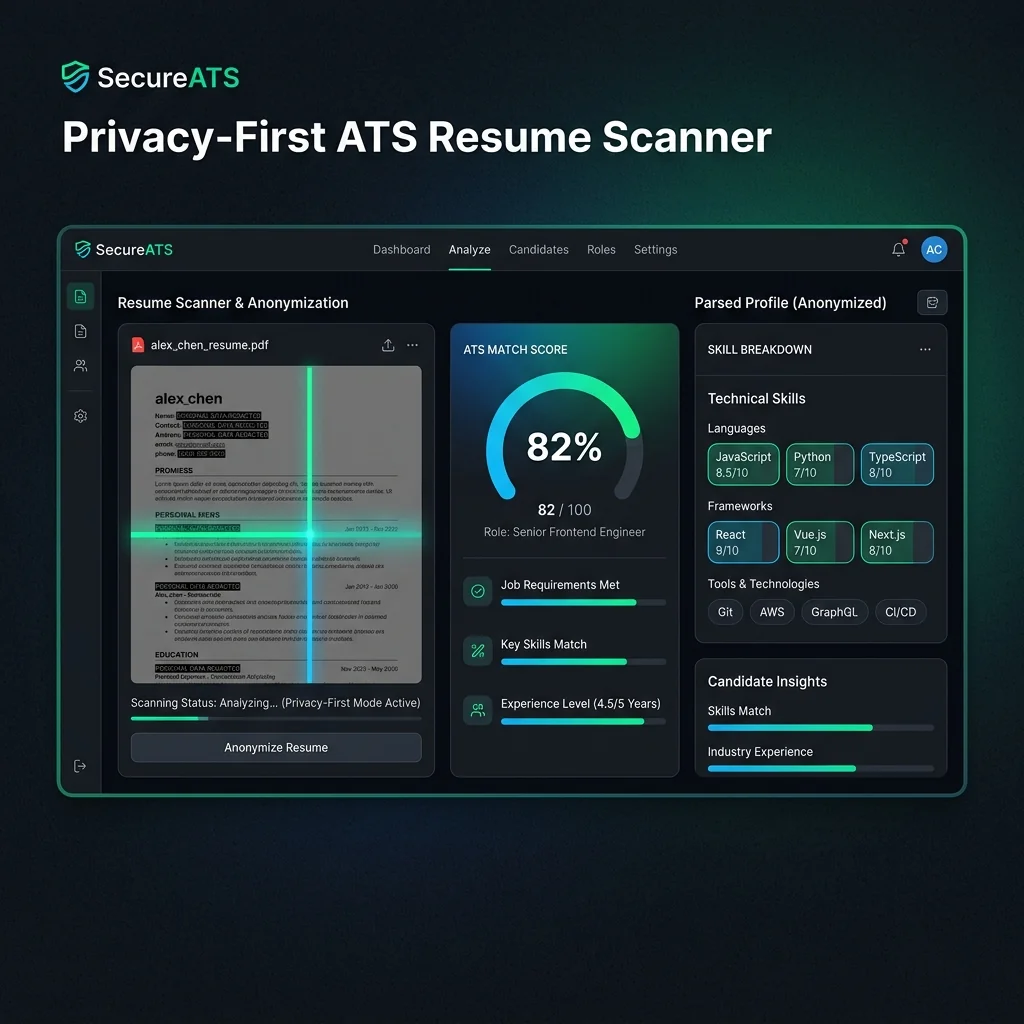
For a deeper dive into technical project architectures, read my guide on Building a Privacy-First ATS Resume Analyzer and check out our breakdown on How Search Engines Process Content.
Which AI Tools I Used to Build My Portfolio
Building a custom, database-backed web application from scratch used to take weeks. By leveraging modern AI developer tools, I completed the entire design, frontend, backend integration, and deployment in record time — without spending a single dollar.
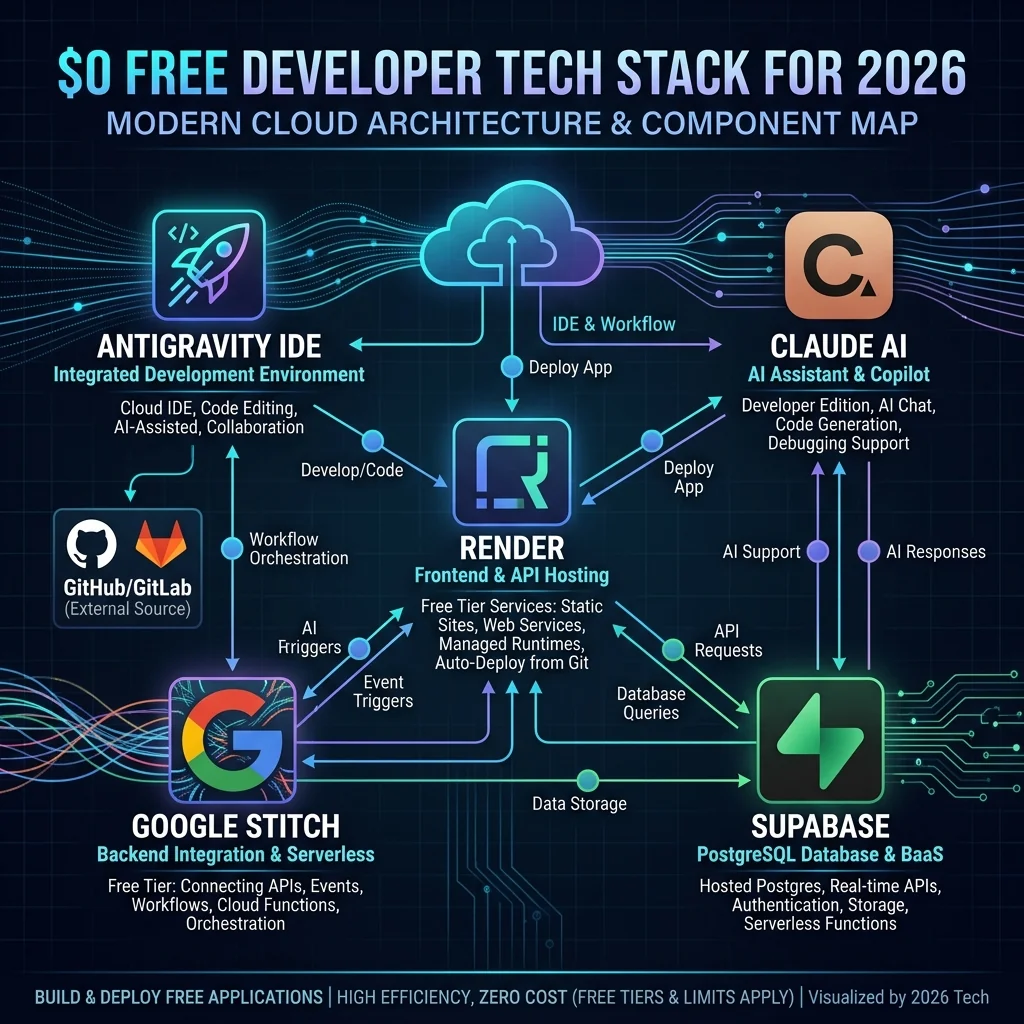
The Core AI Stack Breakdown:
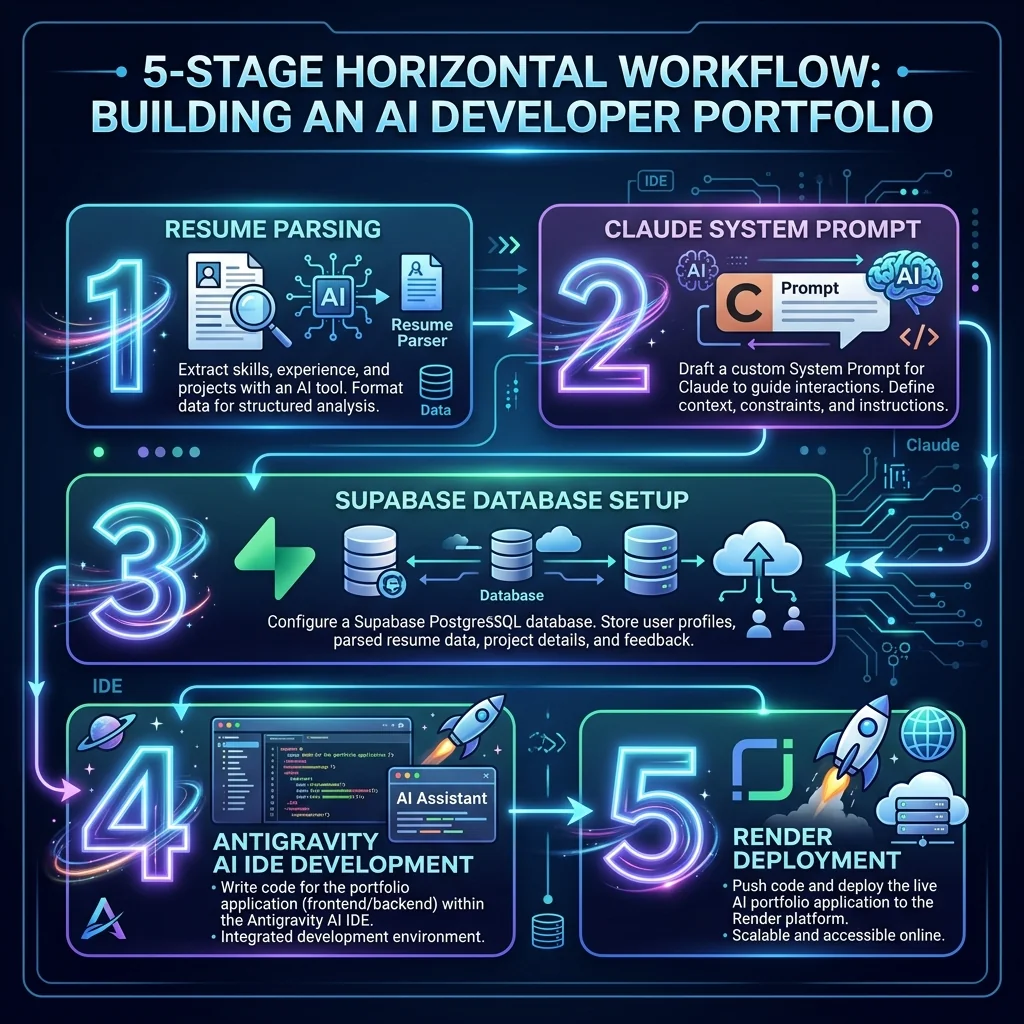
- 1. Google Stitch: Used for rapid UI prototyping and generative visual layout creation. It allowed me to establish design tokens, color systems, and modern visual aesthetics before committing to code. Read my full tutorial on How to Use Google Stitch for Web Design.
- 2. Claude AI (Anthropic): Played the role of lead software architect. I provided raw resume data and project goals, and Claude transformed them into structured system prompt blueprints, database schemas, and clean architectural requirements. Learn how to write effective prompts in my guide to Mastering AI Prompt Engineering.
- 3. Google Antigravity IDE: An advanced agentic AI coding environment. Antigravity allowed me to switch between Gemini 3.6 Pro, Gemini 3.5, and Claude Sonnet 4.6 (Thinking Mode) within the same workspace. It ran automated headful browser verification, tested form submissions live, and self-corrected layout bugs in real time.
- 4. Supabase: Provided an open-source, cloud-hosted PostgreSQL database, real-time client libraries, and instant API generation.
- 5. Render: Handled automated continuous integration and continuous deployment (CI/CD) directly linked to my GitHub repository.
AI Tool Stack Comparison Summary
| Tool | Core Role in Project | Free Tier Capability | Official Resource |
|---|---|---|---|
| Google Stitch | UI/UX Design & Layout Scaffolding | Free public design generation | Stitch Website |
| Claude AI | Architecture & System Prompting | Free tier with daily context usage | Claude AI Portal |
| Google Antigravity | Agentic IDE & Browser Verification | Generous developer workspace tier | Antigravity Docs |
| Supabase | PostgreSQL Database & Auth API | 500 MB Database, 50k MAU | Supabase Platform |
| Render | Cloud Application Hosting | Free Web Services & Static Hosting | Render Hosting |
Step-by-Step: How to Create Your Own Portfolio Website
Follow this step-by-step workflow to build your own developer portfolio using free AI tools.
Step 1 — Prepare an ATS-Friendly Resume Source
Start by organizing your technical credentials: core programming languages, frameworks, past projects, work history, and education. Run your draft through an AI parser to verify ATS (Applicant Tracking System) compatibility.
Step 2 — Generate Structured System Prompts with Claude
Upload your resume file or text into Claude AI and instruct it to act as a Principal Web Architect:
Act as a Principal Full-Stack Engineer. Analyze my resume attached below and create a comprehensive system prompt for building a modern developer portfolio website.

Requirements:
1. Target Stack: Semantic HTML5, CSS3 (CSS Variables), JavaScript (ES6+), Node.js, and Supabase.
2. Architecture: Portfolio showcase + dynamic blog engine + contact form with database persistence.
3. SEO/AEO/GEO: Include JSON-LD Schema (Person & WebSite), meta tags, open-graph metadata, and semantic headings.
4. Output: Structured file organization, database schema definitions, and step-by-step component code.
Step 3 — Provision a Free PostgreSQL Database on Supabase
- 1. Create a free account on Supabase.
- 2. Create a new project named
developer-portfolio. - 3. In the SQL Editor, execute table definitions for your
projectsandblogstables:
-- Create Projects Table
CREATE TABLE public.projects (
    id UUID PRIMARY KEY DEFAULT gen_random_uuid(),
    title TEXT NOT NULL,
    description TEXT NOT NULL,
    tech_stack TEXT[] NOT NULL,
    demo_url TEXT,
    github_url TEXT,
    created_at TIMESTAMP WITH TIME ZONE DEFAULT timezone('utc'::text, now()) NOT NULL
);

-- Enable Row Level Security (RLS)
ALTER TABLE public.projects ENABLE ROW LEVEL SECURITY;
CREATE POLICY "Allow public read access" ON public.projects FOR SELECT USING (true);
Step 4 — Implement Security Protocols & Environment Isolation
Never hardcode sensitive database credentials or API secret keys in client-side script files:
- •Store sensitive parameters in a
.envconfiguration file and add it to.gitignore. - •Use schema validation libraries like Zod for server-side input validation.
- •Secure your HTTP response headers using Helmet.js.
- •Enforce request rate limiting with express-rate-limit.
Step 5 — Develop UI with Google Antigravity Agentic IDE
Open your repository in Google Antigravity IDE. Feed your structured prompt into the AI agent. Let the agent build modular components while utilizing its automated browser verification tool to inspect layout responsiveness across mobile, tablet, and desktop viewports.
Step 6 — Optimize Performance and SEO Infrastructure
Ensure your website achieves top Lighthouse scores and maximum discoverability:
- •Add descriptive
altattributes to all images for screen readers and search crawlers. - •Include standard canonical tags pointing to your production URL.
- •Implement structured JSON-LD schemas (Person and WebSite) to help AI search engines parse your entity information.
Step 7 — Commit Code to GitHub (Excluding Secrets)
Initialize your Git repository and verify that your .gitignore file contains .env and node dependency folders before pushing to GitHub:
# Initialize repository
git init
echo ".env" >> .gitignore
echo "node_modules/" >> .gitignore
git add .
git commit -m "Initial commit: Complete AI-built developer portfolio"
git remote add origin https://github.com/your-username/developer-portfolio.git
git push -u origin mainHow to Publish Your Website for Free Using Render
Once your project code is safely pushed to GitHub, deploying to a global cloud platform like Render takes less than five minutes:
- 1. Sign Up on Render: Log into Render.com and connect your GitHub account.
- 2. Create a New Web Service: Select Web Service (or Static Site if building a purely static frontend).
- 3. Select Your Repository: Grant Render access to your
developer-portfoliorepository. - 4. Configure Build Settings: Set Environment to
Node, Build Command tonpm install, and Start Command tonode server.js. - 5. Inject Environment Variables: Under Environment, add your
SUPABASE_URL,SUPABASE_KEY, andPORTkeys. - 6. Deploy Application: Click Create Web Service. Render will automatically compile assets, provision a free SSL certificate (HTTPS), and generate a live public URL.
main GitHub branch, Render automatically triggers a new continuous deployment pipeline to keep your portfolio up to date without manual intervention.
Security Rules for AI-Generated Apps
Adapted from Taha Jaffri's "Security Rules for AI-Generated Apps" framework. Save this rule set as CLAUDE.md or .cursorrules in your project root directory to enforce automatic security compliance across all AI-generated code.
AI coding models optimize for quick code execution rather than security hardening. While AI-generated code may function correctly in testing, unnoticed security vulnerabilities can emerge in production environments. Follow this comprehensive security checklist:
1. Secrets and Environment Variable Isolation
- • Store all secret credentials, database connection strings, and API keys inside
.envfiles. - • Ensure
.env,.env.local, and related secret files are included in.gitignore. - • Never expose private keys in frontend bundles. Frontend code should only read variables explicitly intended for public exposure.
- • Provide a clean
.env.examplefile in your repository template containing variable names with placeholder values.
// ✅ SECURE: Access secrets securely via environment variables
const supabase = createClient(process.env.SUPABASE_URL, process.env.SUPABASE_KEY);

// ❌ INSECURE: Never hardcode API keys in source files
const supabase = createClient('https://xyz.supabase.co', 'eyJhbGciOiJIUzI1NiI...');
2. Rate Limiting Implementation
- • Authentication Routes: Restrict to 5 requests per 15 minutes per IP address using express-rate-limit.
- • General API Endpoints: Limit to 60 requests per minute per IP address.
- • AI/LLM Proxy Endpoints: Restrict to 10 requests per minute per authenticated user.
- • HTTP Responses: Return an HTTP
429 Too Many Requestsstatus code with an explicitRetry-Afterheader when thresholds are exceeded.
import rateLimit from 'express-rate-limit';

const apiLimiter = rateLimit({
    windowMs: 15 * 60 * 1000, // 15 minutes
    max: 100, // Limit each IP to 100 requests per windowMs
    message: { error: 'Too many requests from this IP, please try again after 15 minutes.' }
});

app.use('/api/', apiLimiter);
3. Server-Side Input Validation & Sanitization
- • Never rely solely on client-side form validation.
- • Validate all incoming request payloads on the server using schema validation libraries such as Zod.
- • Sanitize user-generated HTML strings before rendering to prevent Cross-Site Scripting (XSS) attacks using DOMPurify.
import { z } from 'zod';

const contactFormSchema = z.object({
    name: z.string().min(2).max(100).trim(),
    email: z.string().email().max(254),
    message: z.string().min(10).max(2000).trim()
});

app.post('/api/contact', (req, res) => {
    const parseResult = contactFormSchema.safeParse(req.body);
    if (!parseResult.success) {
        return res.status(400).json({ error: parseResult.error.issues });
    }
    // Process sanitized data safely...
});
4. Database Security & Query Parameterization
- • Always use Object-Relational Mappers (ORMs) or parameterized SQL queries to prevent SQL Injection vulnerabilities.
- • Apply strict Row Level Security (RLS) policies in PostgreSQL/Supabase databases.
- • Never expose raw database stack traces or SQL error messages directly to client applications.
// ✅ SECURE: Parameterized Query
const { data, error } = await supabase
    .from('projects')
    .select('*')
    .eq('id', projectId);
5. HTTP Security Headers with Helmet
Enforce strict security headers across your web application server using Helmet.js:
import helmet from 'helmet';

app.use(helmet({
    contentSecurityPolicy: true,
    crossOriginEmbedderPolicy: true,
    referrerPolicy: { policy: 'strict-origin-when-cross-origin' }
}));
Security Quick Reference Table
| Vulnerability Area | Defensive Control | Recommended Tool |
|---|---|---|
| Secrets Exposure | .env Isolation & .gitignore masking |
Dotenv, Node process.env |
| DDoS & Brute Force | IP Rate Limiting | express-rate-limit, Upstash Redis |
| Input Tampering | Server-Side Schema Validation | Zod, Pydantic |
| XSS Attacks | Content Sanitization & CSP | DOMPurify, Helmet |
| SQL Injection | Parameterized Queries & RLS Policies | Supabase RLS, Prisma, Drizzle |
| CORS Exploits | Strict Origin Whitelisting | Express cors() Middleware |
FAQs About Building a Free Developer Portfolio
.env). Ensure that .env is explicitly listed in your .gitignore file prior to your initial Git commit. Only publicly intended anon keys should ever reach the browser, and write access must always be guarded by Supabase Row Level Security (RLS) policies.
Conclusion: Your Portfolio Is Your Best Pitch
Your developer portfolio is much more than a digital resume — it is your personal brand, your proof of work, and your round-the-clock sales representative. Leveraging modern AI tools like Claude, Google Stitch, Google Antigravity, Supabase, and Render empowers you to design, build, secure, and publish a professional, scalable web application without financial barriers.
The key to career advancement in software engineering is execution. Build your portfolio, document your build process, and ship your projects in public.
Ready to build your next custom web application or AI tool?
Explore my full-stack engineering services or reach out directly for technical collaboration.
Freshness Notice: Last updated September 29, 2026.
Sources: GitHub Octoverse Industry Report, Supabase Documentation, Render Cloud Hosting Documentation, OWASP Top 10 Web Application Security Risks.